Monday, 27 October 2025

Think And Grow Rich — 13 Principles (short)

Think and Grow Rich — 13 Principles (Brief Summary)

Think & Grow Rich — 13 Principles (Brief Summary)

A concise yet slightly detailed explanation of Napoleon Hill’s 13 timeless success principles from his classic book Think and Grow Rich.

  1. Desire – Every success begins with a strong desire for a definite goal. You must know exactly what you want and commit fully to achieving it.
  2. Faith – Believe in yourself and your goal. Through visualization and positive belief, you strengthen the mental state that attracts success.
  3. Autosuggestion – Constantly repeat affirmations and positive statements to influence your subconscious mind and reinforce your faith.
  4. Specialized Knowledge – General knowledge is not enough. Acquire and apply specialized knowledge in your chosen field to create value.
  5. Imagination – Use your creative power to turn ideas into workable plans. Imagination is the workshop where all success begins.
  6. Organized Planning – Create a definite plan for carrying out your desire and take persistent action until it works. Adapt as needed.
  7. Decision – Successful people make firm, quick decisions and rarely change them. Indecision breeds failure and doubt.
  8. Persistence – Keep pushing forward despite difficulties or failures. Persistence converts desire into tangible success.
  9. Mastermind – Surround yourself with a team of supportive, like-minded people who can offer ideas, motivation, and accountability.
  10. Sex Transmutation – Redirect your creative and emotional energy into productive and purposeful action toward your goals.
  11. The Subconscious Mind – Your subconscious connects your desires and faith to reality. Feed it only positive, goal-driven thoughts.
  12. The Brain – A powerful broadcasting and receiving station for thoughts. Keep it tuned to success-oriented and collaborative thinking.
  13. The Sixth Sense – The intuitive faculty that guides you when all other principles are mastered. Trust your inner inspiration and wisdom.
Based on Napoleon Hill’s 1937 masterpiece, Think and Grow Rich. A practical philosophy for achieving lasting success.

Wednesday, 26 June 2024

How to enable the shared folder in Kali Linux?

1) cd /mnt/hgfs 
If the folder is missing --> sudo mkdir hgfs 
2) sudo vim /etc/fstab Enter vmhgfs-fuse /mnt/hgfs fuse defaults,allow_other,nofail 0 0 at the end of the file and save
3) sudo reboot now 
4)ls /mnt/hgfs 
The Shared Folder you enabled in VMware Fusion Settings will appear 


 Reference: https://unix.stackexchange.com/questions/594080/where-to-find-the-shared-folder-in-kali-linux

Monday, 2 December 2019

Whatsapp text tips

> Bold a text  use * in front and back of the text. example *sample*
> Italic a text use _ in front and back of the text. example _sample_
> Strike a text use ~ in front and back of the text. example ~sample~


Sunday, 10 November 2019

Wget big file from google drive public shared files in Linux

wget --load-cookies /tmp/cookies.txt "https://docs.google.com/uc?export=download&confirm=$(wget --quiet --save-cookies /tmp/cookies.txt --keep-session-cookies --no-check-certificate 'https://docs.google.com/uc?export=download&id=FILEID' -O- | sed -rn 's/.*confirm=([0-9A-Za-z_]+).*/\1\n/p')&id=FILEID" -O FILENAME && rm -rf /tmp/cookies.txt

* FILENAME is what the filename in server with extension. example xdownload.zip 
* FILEID is the id from google shared link. example "https://drive.google.com/file/d/12yLOgEUfM1tBxmrSkPHcJmeKenefeKN5/view?usp=sharing" in this link 12yLOgEUfM1tBxmrSkPHcJmeKenefeKN5 is the file id.


Hope it helps...👍 

Magento 2 in localhost windows 10

Facing so many issues in running a Magento in the local environment on windows 10 😓. Yes I know that I too faced it. tried running the Magento in Xampp ended in issues while running the Magento admin...

But no worries here is a short solution. Don't worry its not a lengthy steps.

Here we go.

1) Download wamp 64 bit for windows 10. just google and get the last version. I have installed the 3.1.9 version. ( may this link will help). Run installation in administrator mode 

2) Just install wherever you need. But have the path in mind.

3) Download Magento. (https://magento.com/tech-resources/download). I have gone version 2.2.5 ( just for reference). feel free to explore last and let me know.

4) Extract the Magento zip to Wamp www directory ( D:\Installs\wamp64\www)  as magento2.   after extraction path will be D:\Installs\wamp64\www\magento2 

5) Check localhost in web browsers. you will get as below.
* Marked the php as 7.0.33, the magento 2 needs 7.0 or higher php version. if not having the same version choose for the wampserver64.


Here is the important setups before running localhost/magento2  on browser 

*  Edit php.ini,Modify the below variables as given.                                   (D:\installs\wamp64\bin\apache\apache2.4.39\bin\php.ini)
     max_execution_time = 2000
     max_input_time = 2000
  And save the file.

*  Edit httpd.config in apache path. 
(D:\installs\wamp64\bin\apache\apache2.4.39\conf\httpd.conf)
    enable "LoadModule version_module modules/mod_version.so"( remove the # before the line) and save

6) Restart the service in wampserver64 using restart all services.

7) open browser and load "localhost/magento2". you get the Magento setup process. 

Follow from #4 steps as given in http://agsdinesh.blogspot.com/2019/11/install-magento-2-on-localhost-using.html for Magento setup.

Good Luck 🙏

Here we go 


Thursday, 7 November 2019

Install Magento 2 on Localhost Using XAMPP

Requirements
The version I have used:
*Apache version: Apache/2.4.41 (Win64)
* XAMPP version: 3.2.4
* PHP version:7.1.33
* MySQL version: 8
* Magento version: 2.2.3

1) First, download and install the XAMPP. Follow the installation setup.
Once the installation done, Run the xampp control application.
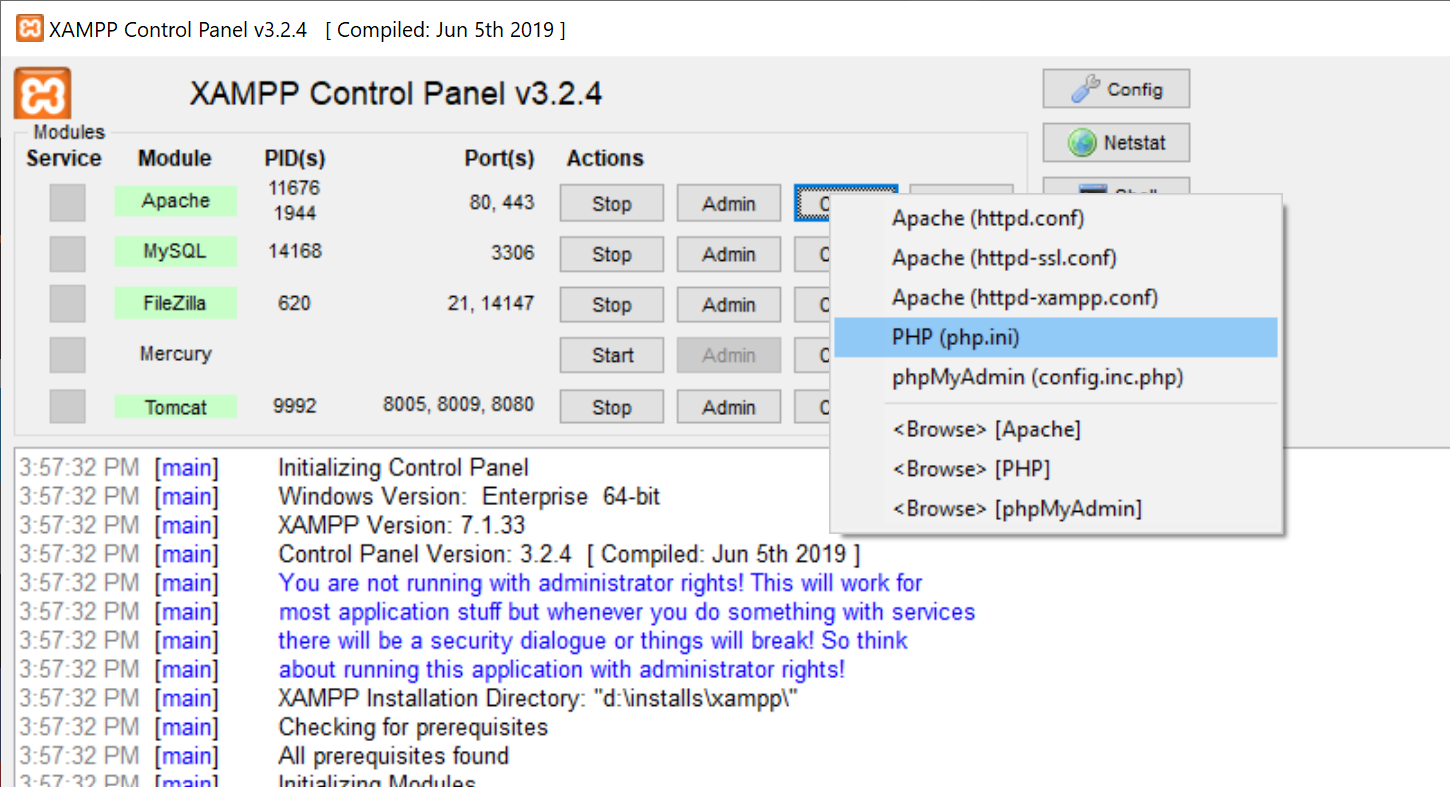
Before starting the apache server, please enable few extensions in php config file.
 List of items to enable in php.ini

                                extension=php_intl.dll
                                 extension=php_xsl.dll
                                 extension=php_soap.dll
* Once done start the apache server, mysql, filezilla and Tomcat.
2) Create a mysql db named "magento2". In Xampp click in the Admin 
and you will get phpmyadmin. Then create a table in name "magento2"


3) Now we are good to get the Magento installation. Download the Magento from the link given above: Magento 2 setup
   Once download completed, extract the Magento zip files to xmapp installation directory under htdocs folder in name as magento
4) Open the web browser and explore localhost/magento. Then click on Agree and Setup Magento.

The first step for installing Magento 2 on localhost is to perform a Readiness check. After successful checking, click on Next.

Now the database configuration page will appear. Here, enter database details and database name which will be the same as the one you created in phpMyAdmin (magento2). After completing this step, click on Next.
Now complete the web configuration, put the 127.0.0.1 localhost ip, and admin panel address. After web configuration, click on Next.
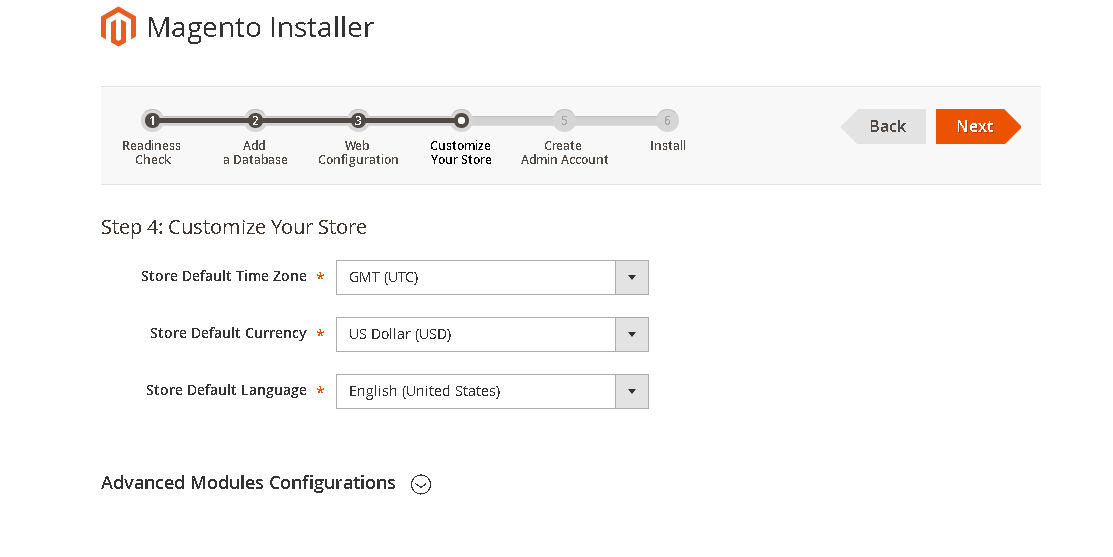
Now customize location and click on Next.

Create an Admin account and click on Next.
 * Remember the user id and password for future use 

Now we are ready to go. Just hit the Install, this may take a while.

Once the installation done, Open web browser and hit 127.0.0.1/magento. you should get home page. 


Admin Magento url will be: http://127.0.0.1/magento/admin

That's it you are done :) .....


PrtScr or Printscreen not working [Resolved]

Think your print screen not working, or you keep on hitting and nothing come up, no worries here is that thing to have in mind.

Windows 10 had made that different.

* Ctrl + PrtScr <- will just add the screen image to clipboard, means you manually need to paste somewhere in word or paint you choose it.

* Win + PrtScr key <- this save the screenshots in "pictures/screenshot" folder.


Hope saved your time.....  😉

How to know your Mobile number

*282# - airtel (verified) 
*888# - BSNL (verified) 
Call 1299 - Jio, will SMS with details (verified) 
*111*2# (not verified) 


Monday, 4 November 2019

Enable Developer Options on Xiaomi & Redmi Phones


  • Go to Settings >> About Phone >> MIUI version.
  • Tap on “MIUI version” for 7 times until developer mode appears. You’ll see the “You are now a developer” message appears on the screen.

Now go to Settings >> Additional Settings >> Developer Options, touch the toggle to enable Developer Option

Friday, 14 September 2018

Perl to download mp3 from the html page using wget

The script I have tried to get the mp3 files from the web.

#!/usr/bin/perl

die "Usage: $0 <url of page> \n" if @ARGV < 1;

sub getLineFromFile
{
my @outArray;
my $in = shift;
open (my $inf,"<",$in) or die "can't reader the $in";
while(my $row = <$inf>)
{
chomp $row;
#print $row."\n";
push (@outArray,$row);

return @outArray;
}

my $url = shift;
`wget $url`;

$url =~ /([^\/]+\.html)/; #Regex to look for last / and token next with .html 
my$filename = $1;

my @lines = getLineFromFile($filename);

foreach my $line (@lines)
{
my $command;
$line =~/<a .*href="(.*download.*\.mp3)">/; #modify if you find any different href url
my $mp3url = $1;
if($mp3url =~ /\.mp3$/){
#print "get me ".$mp3url."\n";
`wget $mp3url`;

}
}
unlink $filename;


hope it helps and save your time 👍

Monday, 27 August 2018

Install cv2 or opencv-python module in MACos

It took a while to figure out the issues during installing the OpenCV to my mac machine.
Here are the steps that I followed to fix it. maybe it could help you too...

I have opened the Terminal and gave "pip install OpenCV-python". Here the problem starts...


$ sudo -H pip install opencv-python
Password:
Collecting opencv-python
  Downloading https://files.pythonhosted.org/packages/ae/f7/01fc83414fbdbb470d6d77ee4a0fd32234046edc4a2e4f7897e3e95ee666/opencv_python-3.4.2.17-cp27-cp27m-macosx_10_6_x86_64.macosx_10_9_intel.macosx_10_9_x86_64.macosx_10_10_intel.macosx_10_10_x86_64.whl (42.2MB)
    100% |████████████████████████████████| 42.3MB 244kB/s 
Collecting numpy>=1.11.1 (from opencv-python)
  Downloading https://files.pythonhosted.org/packages/e7/c1/d5c47de35e366b1c2f60da88a24b25d3037b892417c5c3c5398313fb54f5/numpy-1.15.1-cp27-cp27m-macosx_10_6_intel.macosx_10_9_intel.macosx_10_9_x86_64.macosx_10_10_intel.macosx_10_10_x86_64.whl (24.5MB)
    100% |████████████████████████████████| 24.5MB 569kB/s 
matplotlib 1.3.1 requires nose, which is not installed.
matplotlib 1.3.1 requires tornado, which is not installed.
Installing collected packages: numpy, opencv-python
  Found existing installation: numpy 1.8.0rc1
Cannot uninstall 'numpy'. It is a distutils installed project and thus we cannot accurately determine which files belong to it which would lead to only a partial uninstall.
oops, here 😈 starts...
But no worries I got your back.

Here are the few steps that could solve it.

1) Install the tornado package.


$ sudo -H pip install tornado
Collecting tornado
  Downloading https://files.pythonhosted.org/packages/45/ec/f2a03a0509bcfca336bef23a3dab0d07504893af34fd13064059ba4a0503/tornado-5.1.tar.gz (516kB)
    100% |████████████████████████████████| 522kB 1.5MB/s 
Collecting futures (from tornado)
  Downloading https://files.pythonhosted.org/packages/2d/99/b2c4e9d5a30f6471e410a146232b4118e697fa3ffc06d6a65efde84debd0/futures-3.2.0-py2-none-any.whl
Collecting singledispatch (from tornado)
  Downloading https://files.pythonhosted.org/packages/c5/10/369f50bcd4621b263927b0a1519987a04383d4a98fb10438042ad410cf88/singledispatch-3.4.0.3-py2.py3-none-any.whl
Collecting backports_abc>=0.4 (from tornado)
  Downloading https://files.pythonhosted.org/packages/7d/56/6f3ac1b816d0cd8994e83d0c4e55bc64567532f7dc543378bd87f81cebc7/backports_abc-0.5-py2.py3-none-any.whl
Requirement already satisfied: six in /System/Library/Frameworks/Python.framework/Versions/2.7/Extras/lib/python (from singledispatch->tornado) (1.4.1)
Installing collected packages: futures, singledispatch, backports-abc, tornado
  Running setup.py install for tornado ... done
Successfully installed backports-abc-0.5 futures-3.2.0 singledispatch-3.4.0.3 tornado-5.1

2) Then install the nose package. "sudo -H pip install nose"

3) Actually, this should be the final step but as I have the older version of numpy. It has thrown a stone against 💣💣.

$sudo -H pip install opencv-python

Collecting opencv-python
  Using cached https://files.pythonhosted.org/packages/ae/f7/01fc83414fbdbb470d6d77ee4a0fd32234046edc4a2e4f7897e3e95ee666/opencv_python-3.4.2.17-cp27-cp27m-macosx_10_6_x86_64.macosx_10_9_intel.macosx_10_9_x86_64.macosx_10_10_intel.macosx_10_10_x86_64.whl
Collecting numpy>=1.11.1 (from opencv-python)
  Using cached https://files.pythonhosted.org/packages/e7/c1/d5c47de35e366b1c2f60da88a24b25d3037b892417c5c3c5398313fb54f5/numpy-1.15.1-cp27-cp27m-macosx_10_6_intel.macosx_10_9_intel.macosx_10_9_x86_64.macosx_10_10_intel.macosx_10_10_x86_64.whl
Installing collected packages: numpy, opencv-python
  Found existing installation: numpy 1.8.0rc1
Cannot uninstall 'numpy'. It is a distutils installed project and thus we cannot accurately determine which files belong to it which would lead to only a partial uninstall.

4) So to solve the above issue the numpy need to be updated.

$ sudo -H pip install --ignore-installed numpy
Collecting numpy
  Downloading https://files.pythonhosted.org/packages/e7/c1/d5c47de35e366b1c2f60da88a24b25d3037b892417c5c3c5398313fb54f5/numpy-1.15.1-cp27-cp27m-macosx_10_6_intel.macosx_10_9_intel.macosx_10_9_x86_64.macosx_10_10_intel.macosx_10_10_x86_64.whl (24.5MB)
    100% |████████████████████████████████| 24.5MB 642kB/s 
Installing collected packages: numpy
Successfully installed numpy-1.15.1

5) Now we are ready to install OpenCV

$ sudo -H pip install opencv-python
Collecting opencv-python
  Using cached https://files.pythonhosted.org/packages/ae/f7/01fc83414fbdbb470d6d77ee4a0fd32234046edc4a2e4f7897e3e95ee666/opencv_python-3.4.2.17-cp27-cp27m-macosx_10_6_x86_64.macosx_10_9_intel.macosx_10_9_x86_64.macosx_10_10_intel.macosx_10_10_x86_64.whl
Requirement already satisfied: numpy>=1.11.1 in /Library/Python/2.7/site-packages (from opencv-python) (1.15.1)
Installing collected packages: opencv-python
Successfully installed opencv-python-3.4.2.17


Hope this helps 👍 .....


Tuesday, 19 June 2018

Substring implementation in C

small code snippet of substring implementation in C, may save you time ..


 char *substring(int start, int finish, const char *inString) {

  int inlen = strlen(inString);
    char result[inlen];
    char tmp[2];
    int i,k;
    for (i=start,k=0;i<finish;i++,k++)
    {
    result[k]=inString[i];
    }
    return result;
}


Happy coding 👍😉

Thursday, 4 January 2018

Operation not permitted in MAC OS for delete and move

While trying the delete or move operation in the command prompt, we faced a issue that even root user can't delete or move or rename the folder or file.

was 👀  looking in the found a solution.

May save your time too ...

Steps to resolve:

1) open a Terminal.
2) go to the previous directory in which you face issue. IN my cases ~/Download is the folder in which i can remove any, due to Operation not permitted issue.  So I have moved to /users/xxxx
3)  run the following command in sudo.

     sudo chflags -R nouchg,nouappnd ~/Downloads/ 

replace the folder in which you are facing issue in instead of ~/Downloads/  in above command.

Hope will this helped you 👍


Tuesday, 1 August 2017

Format a new disk and add it to Linux machine

Most of the time when we purchase a new disk for adding to the Linux server or machine, we may face partition issues or mounting issues.


Following are the steps that helped me to get rid of those issue.

Step 1:
Connect the disk to the Linux machine or server. In my scenario Linux flavor CentOS 5.2

Step 2:
Open a terminal in administrator mode or please add sudo for following commands.
  • Run the fdisk -l command. the output will like 
    Device Boot      Start         End      Blocks   Id  System
/dev/sda1   *           1          13      104391   83  Linux
/dev/sda2              14       13067   104856255   83  Linux
/dev/sda3           13068       26121   104856255   83  Linux
/dev/sda4           26122       60801   278567100    5  Extended
/dev/sda5           26122       32648    52428096   83  Linux
/dev/sda6           32649       33170     4192933+  82  Linux swap / Solaris

Disk /dev/sdb: 1000.2 GB, 1000204886016 bytes
255 heads, 63 sectors/track, 121601 cylinders
Units = cylinders of 16065 * 512 = 8225280 bytes

  • Here the /dev/sdb is disk that I have to add to my server.
  • To work on the specific disk open that disk in using fdisk.
  • sudo fdisk /dev/sdb and give option p to print the partition table.
Command action
   a   toggle a bootable flag
   b   edit bsd disklabel
   c   toggle the dos compatibility flag
   d   delete a partition
   l   list known partition types
   m   print this menu
   n   add a new partition
   o   create a new empty DOS partition table
   p   print the partition table
   q   quit without saving changes
   s   create a new empty Sun disklabel
   t   change a partition's system id
   u   change display/entry units
   v   verify the partition table
   w   write table to disk and exit
   x   extra functionality (experts only)
Command (m for help): p

Disk /dev/sdb: 1000.2 GB, 1000204886016 bytes
255 heads, 63 sectors/track, 121601 cylinders
Units = cylinders of 16065 * 512 = 8225280 bytes

   Device Boot      Start         End      Blocks   Id  System

  • In same fdisk console give option n to create new partition. and select primary partition(P)or extended (e). I have used +512000M for creating partition of 500GB

Command (m for help): n
Command action
   e   extended
   p   primary partition (1-4)
p
Partition number (1-4): 1
First cylinder (1-121601, default 1):<Press Enter to choose default>
Using default value 1
Last cylinder or +size or +sizeM or +sizeK (1-121601, default 
121601): +512000M

  • Follow the above step to create next partition too.
  • After creating the partition, that must be written to disk. 
Command (m for help): w

Disk /dev/sdb: 1000.2 GB, 1000204886016 bytes255 heads, 63 sectors/track, 121601 cylinders

  • Next primary step is to mount it to local file system .
  • Before mounting the fdisk should be give extension type , like ext2 or ext3 etc..
  • Run 
mkfs -t ext3 /dev/sdb1
  • then Create local for mounting like /storage01
mkdir storage in home of any mount location.
  • Mount the /dev/sdb1 to /storage01
mount -t ext3 /dev/sdb1 /storage01
  • Follow the same steps to the partitions you have created like sdb2 , sdb3.....

Hope it helped you. Happy storage :)

Tuesday, 25 July 2017

How to change message center number in Moto mobiles


  • First step call the network operator and get the alternative message center number.
  • Then Dial *#*#4636#*#*.
  • Test Run Menu will appear,
  • Select Phone Information.
  • Scroll down for "SMSC". Add the new number and submit/refresh it. 
  • Then the problem must be resolved.

You are done........... 😉

Thursday, 9 February 2017

How to transfer contact to Nokia 130

How to import contacts to Nokia 130 (Dual SIM)
export contacts from google or old phone as a one vcf file (contacts.vcf)
rename it to backup.dat and copy to root of memory card of phone
Menu -> Contacts -> Settings -> Restore contact.


Hooray.......

Monday, 29 August 2016

Installing Cisco AnyConnect VPN on Ubuntu 16.04

Struggling to setting up a new VPN to connect, here is the way that helped...

issue:

# ./vpnsetup.sh 
Installing Cisco AnyConnect Secure Mobility Client...
Extracting installation files to /tmp/vpn.0Zgby3/vpninst625702875.tgz...
Unarchiving installation files to /tmp/vpn.0Zgby3...
Starting Cisco AnyConnect Secure Mobility Client Agent...
Failed to start vpnagentd.service: Unit vpnagentd.service not found.
 
 
FIX 1: 
Try running the follow as super user and try the setup again..

# apt install -y lib32z1 lib32ncurses5
 
didn't help for you, no worries we have another way :) 


FIX 2:

If you get the same error message after trying the fix #1, try running the following 2 commands in super do.

# apt install network-manager-openconnect

# systemctl daemon-reload
 
sucess!!!!!
 
# ./vpnsetup.sh 
Installing Cisco AnyConnect Secure Mobility Client...
Removing previous installation...
mv: cannot stat '/opt/cisco/vpn/*.log': No such file or directory
Extracting installation files to /tmp/vpn.yUyv15/vpninst922924093.tgz...
Unarchiving installation files to /tmp/vpn.yUyv15...
Starting Cisco AnyConnect Secure Mobility Client Agent...
Warning: vpnagentd.service changed on disk. Run 'systemctl daemon-reload' to reload units.
Done!


Here you go....
 
 
The link that saved my time ...
https://technicalsanctuary.wordpress.com/2016/05/28/installing-cisco-anyconnect-vpn-on-ubuntu-16-04/#comment-331


Tuesday, 29 September 2015

How to start vncserver in normal view mode in Linux mint 10 - "julia"

Go to the path /root/.vnc/xstartup file and insert the following lines


========================================================================
#!/bin/sh

# Uncomment the following two lines for normal desktop:
unset SESSION_MANAGER
unset DBUS_SESSION_BUS_ADDRESS
sh /etc/X11/xinit/xinitrc

xrdb $HOME/.Xresources
xsetroot -solid grey
x-terminal-emulator -geometry 80x24+10+10 -ls -title "$VNCDESKTOP Desktop" &
x-window-manager &
# Fix to make GNOME work
export XKL_XMODMAP_DISABLE=1
/etc/X11/Xsession
exec /usr/bin/gnome-session --session=gnome-classic &
gnome-session --session=gnome-fallback &

========================================================================

yep .. done .. 

Good Luck :) 

Monday, 27 July 2015

Dr. Abdul Kalam's ‪#‎Letter‬ to Every Indian


Dr. A P J Abdul Kalam does it again… what he always does best ! Read out his below speech of last month..hats off to this man.....


Dr. Abdul Kalam's ‪#‎Letter‬ to Every Indian


Why is the media here so negative?

Why are we in India so embarrassed to recognize our own strengths, our achievements?

We are such a Great NATION.

We have so many amazing success stories but we refuse to acknowledge them. Why?

We are the first in milk production.

We are number one in Remote sensing satellites.

We are the second largest producer of wheat.

We are the second largest producer of rice.

Look at Dr. Sudarshan , he has transferred the tribal village into a self-sustaining, self-driving unit..

There are millions of such achievements but our media is only obsessed in the bad news and failures and disasters.

I was in Tel Aviv once and I was reading the Israeli newspaper. It was the day after a lot of attacks and bombardments and deaths had taken place. The Hamas had struck. But the front page of the newspaper had the picture of a Jewish gentleman who in five years had transformed his desert into an orchid and a granary. It was this inspiring picture that everyone woke up to. The gory details of killings, bombardments, deaths, were inside in the newspaper, buried among other news.
In India we only read about death, sickness, terrorism, crime.
Why are we so NEGATIVE?

Another question: Why are we, as a nation so obsessed with foreign things?

We want foreign T.Vs,
We want foreign shirts.
We want foreign technology. Why this obsession with everything imported.

Do we not realize that self-respect comes with self-reliance?

I was in Hyderabad giving this lecture, when a 14 year old girl asked me for my autograph. I asked her what her goal in life is..
She replied: I want to live in a developed India.

For her, you and I will have to build this developed India.

You must proclaim.
India is not an under-developed nation;
it is a highly developed nation...

YOU say that our government is inefficient.

YOU say that our laws are too old.

YOU say that the municipality does not pick up the garbage.

Y OU say that the phones don't work, the railways are a joke. The airline is the worst in the world, mails never reach their destination.

YOU say that our country has been fed to the dogs and is the absolute pits.

YOU say, say and say..

What do YOU do about it?

Take a person on his way to Singapore.
Give him a name - 'YOURS'. Give him a face - 'YOURS'. YOU walk out of the airport and you are at your International best.

In Singapore you don't throw cigarette butts on the roads or eat in the stores.

YOU are as proud of their Underground links as they are.. You pay $5 (approx. Rs.. 60) to drive through Orchard Road (equivalent of Mahim Causeway or Pedder Road) between 5 PM and 8 PM.

YOU come back to the parking lot to punch your parking ticket if you have over stayed in a restaurant or a shopping mall irrespective of your status identity…
In Singapore you don't say anything, DO YOU?

YOU wouldn't dare to eat in public during Ramadan, in Dubai ..

YOU would not dare to go out without your head covered in Jeddah.

YOU would not dare to buy an employee of the telephone exchange in London at 10 pounds (Rs..650) a month to, 'see to it that my STD and ISD calls are billed to someone else.

YOU would not dare to speed beyond 55 mph (88 km/h) in Washington and then tell the traffic cop, 'Jaanta hai main kaun hoon (Do you know who I am?). I am so and so's son. Take your two bucks and get lost.'

YOU wouldn't chuck an empty coconut shell anywhere other than the garbage pail on the beaches in Australia and New Zealand ..

Why don't YOU spit Paan on the streets of Tokyo?

Why don't YOU use examination jockeys or buy fake certificates in Boston ???
We are still talking of the same YOU.

YOU who can respect and conform to a foreign system in other countries but cannot in your own.

YOU who will throw papers and cigarettes on the road the moment you touch Indian ground.

If you can be an involved and appreciative citizen in an alien country,
Why cannot you be the same here in India ?

In America every dog owne r has to clean up after his pet has done the job. Same in Japan ..

Will the Indian citizen do that here?

We go to the polls to choose a government and after that forfeit all responsibility.

We sit back wanting to be pampered and expect the government to do everything for us whilst our contribution is totally negative.

We expect   the government to clean up but we are not going to stop chucking garbage all over the place nor are we going to stop to pick a up a stray piece of paper and throw it in the bin.

We expect the railways to provide clean bathrooms but we are not going to learn the proper use of bathrooms.

We want Indian Airlines and Air India to provide the best of food and toiletries but we are not going to stop pilfering at the least opportunity.This applies even to the staff who is known not to pass on the service to the public.

When it comes to burning social issues like those related to women, dowry, girl child! and others what do we do?
We make loud drawing room protestations and continue to do the reverse at home.
OUR EXCUSE?
'It's the whole system which has to change, how will it matter if I alone forego my sons' rights to a dowry.'

So who's going to change the system?
What does a system consist of?
Very conveniently for us it consists of our neighbours, other households, other cities, other communities and the government.
But definitely not ME & YOU.

When it comes to us actually making a positive contribution to the system we lock ourselves along with our families into a safe cocoon and look into the distance at countries far away and wait for a Mr.CLEAN to come along & work miracles for us with a majestic sweep of his hand or we leave the country and run away like lazy cowards hounded by our fears we run to America to bask in their glory and praise their system. When New York becomes insecure we run to England. When England experiences unemployment, we take the next flight out to the Gulf. When the Gulf is war struck, we demand to be rescued and brought home by the Indian government.
Everybody is out to abuse and rape the country.

Nobody thinks of feeding the system.

Our conscience is mortgaged to money.

Dear Indians, The article is highly thought inductive, calls for a great deal of introspection and pricks one's conscience too…..

I am echoing J. F. Kennedy's words to his fellow Americans to relate to Indians…..'
ASK WHAT WE CAN DO FOR INDIA AND DO WHAT HAS TO BE DONE TO MAKE INDIA WHAT AMERICA AND OTHER WESTERN COUNTRIES ARE TODAY'

Lets do what India needs from us.
Forward this letter to each Indian for a change instead of sending JUST JOKES.

Thank you …
Dr. A.P.J. Abdul Kalam
He only passed away but not his words... try to follow his words.... jaihind